
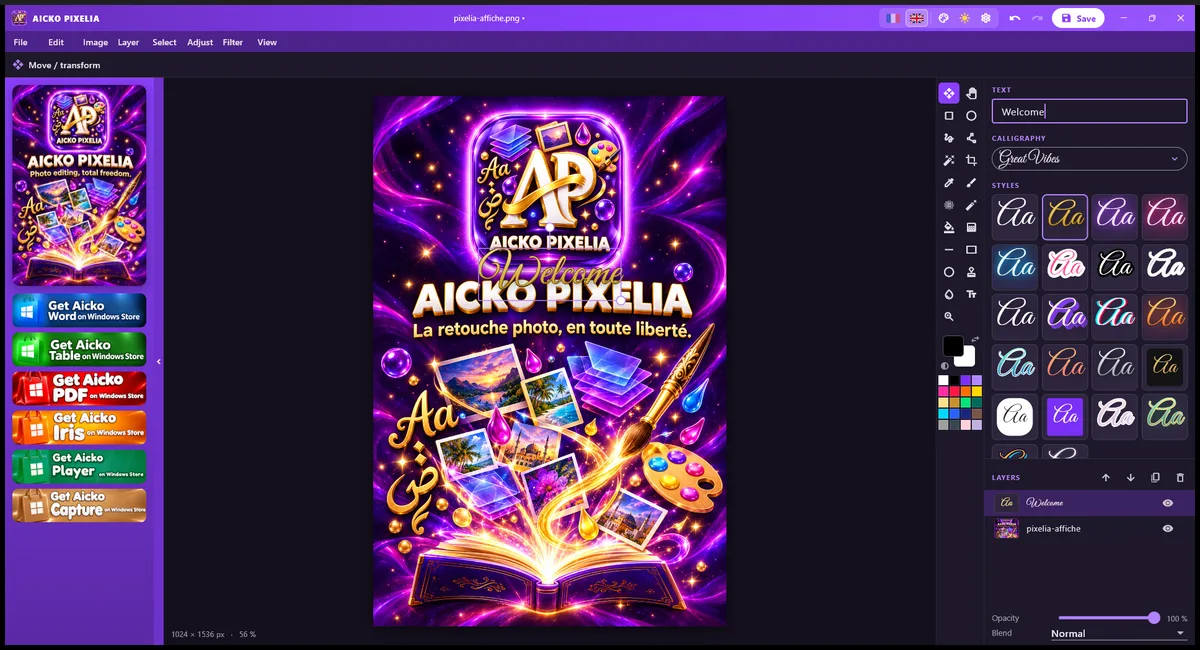
AICKO PIXELIA is a free photo editor for Windows 10 and 11 that offers layers, filters, cropping, text and calligraphy fonts. You export the result as a PNG or JPG image.
It keeps to the essentials, so a beginner can retouch a picture without learning a professional program. Teachers, students and families can use it to prepare posters, covers and class pictures. It is available from the Microsoft Store.
Get AICKO PIXELIA
At a glance
- Platform: Windows 10 and 11 (Microsoft Store)
- Price: free
- Tools: layers, filters, crop, text
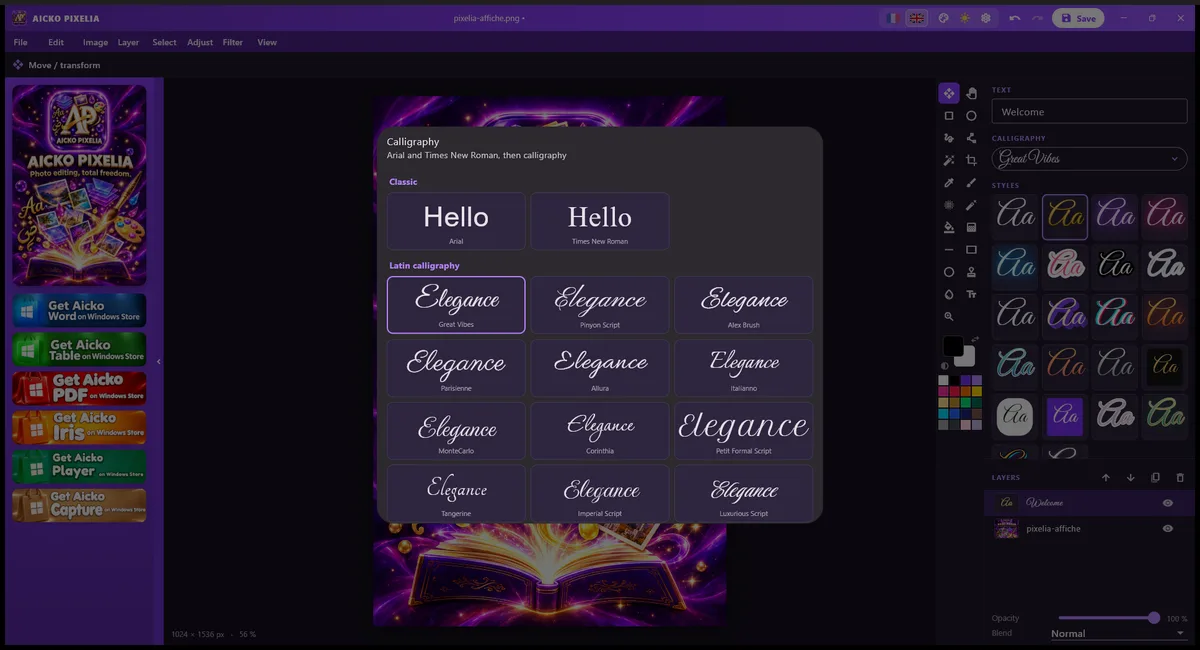
- Fonts: 18 Latin and 12 Arabic calligraphies
- Export: PNG and JPG
What this free photo editor offers
The program works with layers. Each layer has its own opacity, blend mode and place in the stack, so you can add a title above a photo, a frame behind it, or a second picture on top, and change any of them later without damaging the others.
Image adjustments and filters let you correct light and colour, and the crop tool trims a photo to the shape you need. You can also change the size of the document.
Who it is for
It is made for people who want nicer pictures but find big editors heavy: a teacher who makes a cover for a worksheet, a student who prepares a poster for a presentation, a parent who touches up a photo. The interface is violet by default, and you can change the colour in the settings.
Main features
- Layers with opacity, blending and ordering
- Filters and adjustments, crop, document size
- Text in Arial and Times New Roman, plus 18 Latin and 12 Arabic calligraphy fonts
- 22 text styles such as neon, gold, sticker, 3D and glitch
- Export to PNG or JPG
- French or English interface
Getting started
- Install AICKO PIXELIA from the Microsoft Store.
- Open a photo, or create a new document of the size you want.
- Crop the picture and apply a filter or an adjustment.
- Add a text layer and try one of the text styles.
- Export the result as PNG or JPG.
Why a maths learner will like it
A good visual makes a revision sheet easier to remember. With layers you can place a title, a diagram and a colour band on one page, then export it as a picture. Take a photo of your handwritten summary, crop it, brighten it and add a label. For content to revise, see the lessons and the math books on this site, then build a poster from what you learned.
A typical use
Say you need a cover for a revision booklet. Create a document, drop in a photo on the bottom layer and crop it to fit. Add a coloured band on a second layer and lower its opacity so the picture shows through. Then write the title on a text layer in a calligraphy font and choose a style such as gold or neon. Adjust the light of the photo, move the layers until the page feels balanced, and export a PNG. If you change your mind about the colour of the band, you only edit that layer.
Tips
Work with one layer per element, so you can change a single thing without starting again. Keep a copy of the original photo, export to PNG when you need a sharp image with text and to JPG when you need a lighter file. Try the text styles on a short title first; they look best on a few words. Everything runs on your computer.
Frequently asked questions
Is there a free photo editor for Windows with layers?
Yes. AICKO PIXELIA is free for Windows 10 and 11. It works with layers that have opacity and blend settings, and includes filters, adjustments, cropping, text and export to PNG or JPG.
Does AICKO PIXELIA support Arabic calligraphy?
Yes. Besides Arial and Times New Roman, the program includes 18 Latin and 12 Arabic calligraphy fonts, and 22 ready-made text styles such as neon, gold, sticker, 3D and glitch.
Which image formats can I export from AICKO PIXELIA?
You can export your work as PNG or JPG. PNG is a good choice for sharp images with text, and JPG gives a lighter file for sharing. You can also change the document size before exporting.
Is AICKO PIXELIA hard to learn?
No. It includes only the essential tools, so there are few menus to learn. Layers, filters, crop, text and export cover most needs. The interface comes in French and English and the colour can be changed.
